Sunday, 20 October 2013

Decisions....Decisions....

I understand I haven't blogged anything for a little while - I have been busy with trying to sort out my proposal for my dissertation that is due in a couple of weeks (which is actually coming along very well)

I haven't got much reading material to blog, so I figured I would do something a little bit different, this is to do a blog post on what Application I will be using for this project.

There are a number of 3D Application software available, here is a name of a few that come too mind:
  • Autodesk 3D Studio Max
  • Cinema 4D
  • Autodesk Maya
  • Blender
There's quite a lot out there, but I can only use one, instead of going through what I have been told by a lot of people, I figured it would be a good idea to have a look at a few animation jobs and see what they required and that helped base my decision even more.


(Note: I have keyed it all somewhat: Green is the skills I currently have, Orange is what I hope to get out of my dissertation when it is finished - god willingly)

So, the table shows a few examples of some jobs available in animation, the ones in orange text are the skills that I hope to be more efficient in when the project is over. So, notice two out of three of those want people who are efficient in using Autodesk Maya - which from what I heard is the one that is used more for animating than most of the other software available. 

The other stuff that is in Orange works really well for me in terms of what I hope to achieve as the stuff I get marked on as well as all the skills I hope to achieve and improve upon by the end of it all and it also means that in some cases I am on the right track.

Hope you enjoyed the read, they'll be more reading material put up this coming week, so keep your eyes peeled!

Friday, 11 October 2013

3D Art Essentials - Chapter 8 Continued

This is a continuation from the last post, I figured instead of giving you a hell of a lot of information to take in at one time - I figured it'd be better if I split it so it'd be more or for the both of us. Partly because I didn't want to write an insane amount in one go and also to make it bearable for you all. So, let's resume!

Keyframing
Using keyframes is a fundamental tool used in computer animation - with this you define the start, the middle and the ending positions - almost anything can be keyframed: from positions, rotation, size, deformation, colour and the texture. Usually done on a timeline.

Animating with Graphs
Keyframes are placed on a timeline and the animation graphs show a line which is effectively the timeline - this shows all the keyframes and how long each action lasts.

There are three main types of interpolation: stepped interpolation, linear interpolation and curved interpolation.
Stepped Interpolation (key) - the values don't change until the next keyframe.
Linear Interpolation - each keyframe is connected in a line, it's smoother but the animation turns out jerky doing it that way.
Curved Interpolation - the points are connected by a curve, this makes changes in the speed or direction, or any other trait eased in and out of something. It's similar to how a chameleon changes its colour.

These bits were very promising - while I have animated in timeline using keyframes in the past, it's still not a bad thing to refresh your memory of it all. Whereas things like the graph editor that I knew existed but it's just something I have never used before, it's going to be something that I will need to learn and understand by the end of this module if I am ever going to improve in animation.

It also touched on things like Motion Capture - which is where performers in a skin-tight suit with markers on it - act out the movements. It sounds really good and there are a number of games that I know from the top of my head that use this - Uncharted, Tomb Raider use too, even Harry Potter and the Deathly Hallows Part 2 for some who didn't know and so on. This kind of animating is very powerful and looks really cool to use and try out, but for the sake of this project I won't be using it, few reasons for that, main one being that the university doesn't have a motion-capture studio and the most important one of all - it's too expensive. 

The chapter spoke about Facial Animation which is something I will do if I need it, but I figured just in case I will share what I read up on. There was a Facial Action Coding System (FACS) was developed in 1978 by Paul Eckman - who was a psychological studying emotion and facial expressions. It describes 64 distinct facial action units (AUs), it doesn't talk about expressions like raised eyebrows but it goes into detail about what muscles in the face. It's IMPORTANT to understand the universal emotions as they are recognized around the world. There are six universal expressions: happiness, surprise, disgust, fear, sadness, anger.

It's very important to study expressions and get them on point as possible, it's close but not realistic then people will have a hard time to relate to the emotion the character is making. Facial rigs requires a skeleton rig in the jaw - and the deformations in the face require a good underlying topology. Facial rigs can also be a full musculoskeletal simulation - the rig must create several expressions. 

Finally to end the blog post, there were a few things that were worth mentioning - sometimes when it comes to having to animate for dialogue the animators act out the animation themselves while listening to the dialogue track. Draw quick sketches of your animations on paper - make them rough so it's a case of if they are bad they can be easily thrown out. Consider the timing and poses used within your animation and finally, keep a note of the feedback you receive from your animations as it can be very helpful.

That's it for now folks, hope you enjoyed the read, until the next time :)

Biblography


  • Chopine, Ami. "Chapter 8: Animation - It's Alive." 3D art essentials the fundamentals of 3D modeling, texturing, and animation. Oxford: Focal Press, 2011. 103-116. Print.

3D Art Essentials - The Twelve Principles of Animation


Welcome back to another blog post for my dissertation - hope you all enjoyed the previous post because it's now for a part of the eighth chapter. This was an enjoyable read and it's helped me learn more about the kind of things to consider.

The Twelve Basic Principles of Animations
Before I touch on those principles, the book gave a good overview on what the purpose of animation is that I wanted to share. The purpose of animation is to tell a story - to capture images of life, and communicate with others.

1. Squash and Stretch
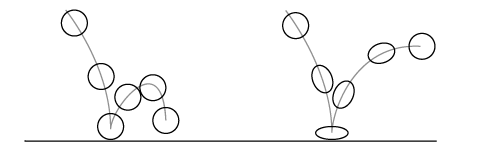
Think of a bouncing ball: when it hits the ground - it squishes, the volume must stay the same so it can stretch. It's a principle that isn't just limited to think like bouncing balls, or tummies even - it's used for facial expressions. Puffing your cheeks will result in stretching around your mouth.

Pic 1: Bouncing Ball example of Squash and Stretch


Pic 2: An image furthur backing up that squash and stretch isn't just limited to a bouncing ball, the principles can be applied to things such as a character jumping.


2. Anticipation
This principle is about giving the audience a clue of what's about to happen next, though it's not always a bad thing on not having any anticipation as it can surprise the audience. However, building up the anticipation towards something and then nothing happens is called being anticlimactic. Understanding this principle helps bring your story forward, it can set up comedic moments or even startle the audience.

3. Staging
This is all about setting the scenery for your movie - be it things like the personality of a character, the mood, a clue, foreshadowing of events and etc. The key here is to make sure that you don't have anything that isn't of any unimportance in the scene - this can lead to the audience getting distracted. Staging can be set as post-production - specifically for colour and lighting adjustments.

4. Straight-Ahead Action and Pose to Pose
Referring to styles to draw your animation.
Straight-Ahead: drawing and changing poses through the scene, beginning to end. This is good for action and spontaneity , but when the characters are hand drawn - loses their proportions and volume.
Pose to Pose: when an animator carefully plans the animation - draws the key poses and then fills in all of the movement that is in between those poses. This works well in computer animation as the software fills in the motion in-between with the use of keyframes.

5. Follow Through and Overlapping Action
This is when certain parts of a character - such as hair, clothing and so on continue moving after the core part of the character stops. Another name for this is "drag" - when the character starts to move then other things catch up to it.
Overlapping action is when things are moving at different rates, such as a head while an arm is head is turning while an arm is moving.

6. Slow In and Slow Out
It describes an action that never just begins or stops instantly either, when it starts it's a slow beginning and then it speeds up and as it reaches the end it starts to slow down. This is used to help pull the audiences awareness throughout all the action. In computer animation, this is achieved by using curves in the animation graph editor.

7. Arcs
It's best described in the sense that people, creatures, and often objects move in a certain way - you'd trace those movements as paths as curves. Linear movements are often seen as mechanical - so this works well with animating robots or certain characters that are supposed to look disturbing.

8. Secondary Action
These are the actions that help benefit the actions a character is doing, should be noted however that if it distracts from what the character is going - get rid of it or rethink of ways to remedy it.

9. Timing
The timing of the story and physical actions. Physical action is all about making sure the actions occur in the right time and pace.

10. Exaggeration
Taking reality and making it more extreme than it already is. More or less anything can be exaggerated: body and head shapes, expressions, actions, aspects of setting, the storyline, etc.

11. Solid Drawing
Referencing real life in your drawings. The book also mentioned that taking a few drawing classes so you can keep proportions, composition and perspective.

12. Appeal
The character must appeal to the audience. They don't necessarily have to sympathize with them - they need to appeal, villains look cool and we enjoy rooting against them. The appeal in characters does have a fair bit to do with the appearance you give them - clothing worn, facial expressions and the way they act towards others.

This covers the twelve basic principles of animation - there are a few other things I would like to mention. When I look at this list I see a few things I will definitely be using for my own animations, that would be Anticipation is one I will definitely add in my future animations, timing is very important as all the actions need to be evenly spread so it's not rushed otherwise it can cause confusion - this happened with one of my animations in college (which will be further explained in a later blog post).

Well, glad you enjoyed the read as much as I did, stay tuned as there will be more in a little bit :)

Bibliography

  • Chopine, Ami. "Chapter 8: Animation - It's Alive." 3D art essentials the fundamentals of 3D modeling, texturing, and animation. Oxford: Focal Press, 2011. 103-116. Print.
  • Pic 1: "The Prinicples of Animation, Squash and Stretch." evl :: electronic visualization laboratory. N.p., n.d. Web. 10 Oct. 2013. <http://www.evl.uic.edu/ralph/508S99/squash.html 
  • Pic 2: Halse, Sashya Subono. "April | 2010 | Road2Animate." Road2Animate | One way road to character animation…. N.p., n.d. Web. 10 Oct. 2013. <http://road2animate.wordpress.com/2010/04


Wednesday, 9 October 2013

3D Art Essentials: The Fundamentals of 3D Modelling, Texturing and Animation - Chapter 7 Rigging: Pages 85-97

Well, I promised that I would start blogging some notes I have made from some of the readings I have undertaken. So I figured it would be good to start with the this chapter on rigging that was in the 3D Art Essentials book from Ami Chopine. Some of this stuff I already knew about but it was good to refresh my memory on the subjects covered in this chapter.

Well, let's get started:

Parent + Child
This is a well known way of working within hierarchies. Hierarchies are an easier way of categorizing within a rig or the entire model. So, for example let's say the person who created the model rigged it and then named all the joints - the person animating can then see what joint is what and how they are connected.

This isn't always the case however, just because the objects aren't connected doesn't mean they can the parents of other assets - creating something like a solar system is the example used in the book: the sun would be the parent to all the other planets within the solar system, the planets would then be the parent to the sphere. In hierarchies the objects either.

Bones and Joints
Joints (or to name them correctly Joint Deformers) are places where the model can be bent or deformed. Clicking again while the joint tool is still selected and another joint is then created and that joint will then be the child of the previous joint.

Skeletons
You can create create another child joint from another joint (the wrist is the parent joint to the knuckles in the hand). This is for more complex hierarchies that are usually used for more detailed, complicated models. One of the things the chapter says (and something I learnt from my past experiences in this) NAME THE JOINTS! (properly I might add) - it will confuse you later on if you are not aware of what joint is which and what it moves. It's also worth knowing that you can mirror joints - which is a time saver if the joints are the same on the other half of the model.

Creating the Rig
Good knowledge of the sort of anatomy for the model you are going to be rigging is always good to know, if you're going to rig a human it's easier to use yourself or a friend as a reference to know where exactly the joints are going to be. When the rig is finished you;ll want to create a bind pose. A bind pose is basically a starting pose that you can easily go back too in case something happens. It's also said that it's good to usually have a starting pose in mind: T Pose or Y Pose.

- T Pose: standing with their arms outstretched looking like a T. This stops the overlapping of parts.

- Y Pose: where the arms are stretched at a 45 degree angle. This puts the shoulders in a more natural position while maintaining distance between arms and legs needed for skinning.

You will want to take into account alignment consideration when it comes to joints rotation axis. To simply put it - have the rotation points make sure the X Axis of the joint is in the direction of the length of the bones, have the Y and Z Axis pointing in the same direction, ideally with the Z rotation pointing to the back of the Y and the Y rotation pointing down.

When joints aren't properly oriented will lead to a Gimbal Lock. Gimbal Lock happens when two axis overlap. When joints are placed - SET THE VALUES OF ROTATIONS TO 0! And referring to an earlier point - when when building the skeleton use mirror and duplicate tools to help make it even.

Joint Limiting
Self explanatory, obviously your joints will only bend so far - unless you're double jointed (or flexible). So, when it comes to determining the limits of your joints in your model for a human character for example - use your body to determine where those limits  are.

Kinematics
Kinematics are the study of how things move when forces act upon them. There are two approaches to this:
- Forward Kinematics (FK) - the case joints will move the child joints to the position you are looking for. Like how the right shoulder joint will move the other joints that follow down the rest of the right arm.
- Inverse Kinematics (IK) - makes the joint that would be the child become the parent joint to the joints that come before it.
To have your animation have good, natural movement - you will need to use both forms of kinematics.

Skinning
It's connecting the skeleton to the model - or binding as it is also known as.

Rigid Biding
Good for skinning things that only have one surface. One vertex is assigned to one joint and every vertex is influenced by that joint.
The problem you'll get with rigid binding is that you get strangely stretched and punched parts of the surface where the bend is. To avoid this you'd use a specialized lattice like a flexor (that rounds out the surface at a binding location) can improve appearances while flexing. The lattice is then bound to the surface so when you move the joint it is bound too - the model moves more well. Remember, rigid binding is different to rigid bodies:
-  Rigid Binding: a type of influence of the joint deformer on the surface.
- Rigid Body: a surface that can't be deformed.

Smooth Binding
This is better for organic models as it offers you the chance to add weight to the influenced joint - this is so that the joint can influence some of the vertices more than others.

Muscles
This makes for better realism when simulating muscles under the skin. Muscle deformers take on the role of making animation look as if the muscles are doing the movement in the joint. When they're attached to the right places on the model, and change shape when it's translated onto the model.

Rigs can also be useful for things that don't need a skeleton - say you're animating a horse, you could easily use a rig on the tail to get the motion you are looking for.

Well, that pretty much the information I got from this chapter of the book - to be honest some of the things like kinematics I knew about previously but it's always good to refresh your memory on certain things every now and then so it can stick - all in all it was an interesting chapter. It's given me a lot to think about when it comes to my own - hopefully you will see all this in my own work.

Next blog post: will be the next chapter of this book - talking about animation principles and the like. Until then :)

Bibliography

  • Chopine, Ami. "Chapter 7: Rigging." 3D art essentials the fundamentals of 3D modeling, texturing, and animation. Oxford: Focal Press, 2011. 85-97. Print.


    • Sunday, 6 October 2013

      Academic Readings

      So, now I have a good idea of what it is I want to set out and archive, I had to look up some books, articles and the like that would be benefit me the most. So, signed up the local library in my area and spent a while looking for books - which proved fruitless but I did come across a couple that proved to be useful so far:

      3D Art Essentials: The Fundamentals of 3D Modeling, Texturing and Animation by Ami Chopine - this was a book I found in my local at home and again at the University Library. It has a couple of chapters on some stuff that will prove very useful: Chapter 7 is about Rigging and Chapter 8 is about Animation - so things to consider and stuff.

      Principles of Three-Dimensional Computer Animation {Third Edition} Modeling, Rendering and Animating with 3D Computer Graphics by Michael O'Rourke - I haven't read this one yet but it does have some information on Animation and a couple of chapters on Rendering that I am sure will be useful for when I make renders of the finished animations.

      As far as books go, I haven't really got much at the moment but I do have a list of things I will look up I will be most useful, I have a few articles I came across that are all bookmarked at the moment that will have notes made on and then blogged about soon. 

      I have also been giving things to look up on that are completely outside of games: Non-verbal communication (NVC) for things like body language, topology - of how meshes will deform and etc.

      I have a few notes ready to blog but that will be up in the next few days or so. I will be gathering more information between now and then. Keep your eyes peeled folks!

      Dissertation Idea

      Well, the time has come. Final year of university and this is the major project that will probably cause me more anger than I care to think - though I am looking forward to it :D

      Over the summer, I had to think about exactly what I wanted to do for my dissertation, and one of the main ideas I wanted to do was 3D animation. I have delved into it a bit in college and I really enjoyed creating it and it was something I want to take to the next level. So, it would of been a case of, I modelling the environment, the assets in the environment and the characters.


      (left: This is a screenshot of the first 3D animation I created, Ending - used simple animation that wasn't too difficult to do)


      (right: the second 3D animation, Glove Battle - this one had gloves rigged - it wasn't the best of animations but it's something I can learn from)


      So, I e-mailed one of my lecturers about it and he actually gave me some really good advice on how to go about the whole thing. He also gave me a good piece of advice that helped me consider:

      "A superbly observed and executed twenty second sequence of an elf sprinting into an imaginary battling, loosing arrows and barrel rolling and evading crossfire will do so much more to inform a good grade than a three minute story-driven sequence of character relationships which would spread you far too thin."

      That really helped me a lot because it made me realize that as long as I can get the point of what it is I want to do - which is to get better and more acquainted with animation. So I have since then decided to rethink the original idea.

      So, after talking it through - I've decided I am going to do 3D Character animation. It will be a case of finding copyright free models or using models a friend of mine at another university, rig the skeleton to the model, skin the rig to the model (and cleaning it up) and then animating it. So, my marks will be on how well the rig is, the skinning of the model and then the animation itself. I did consider getting marked on modelling but that would be taking on too much and the criteria I want to be marked on is broad enough already. This is something that goes quite broad because there are many things that uses 3D animation of characters, be it games, film, television commercials and so on. Animating in the games industry will always be the one I will strive for but there's no harm in keeping options open.

      The only problem I am having with at the moment is deciding on which software I am going to be animating in. I have heard that Autodesk Maya is the software that is mainly used for animating whereas 3DS Max is mainly used for the modelling. It sounds like there is only one answer, but the fact of the matter is I have used 3DS Max for the past three years I have been studying this course though I have used Maya in the past for animating and haven't really used that software recently. So, it's a case of going by what the experts say or try and be the person who has the skills in both software packages - even though I know that it doesn't stop there, eventually I will need to be efficient in using a number of software that do the same thing.

      I will keep you all posted on updates as the project goes on, I hope you all tune in and enjoy the journey and wish me luck :)